
CleanPro
AJ IT SolutionsTools
3.626.00 Reviews
- Version
- 1.1.0
- Installs
- 100.00K
- Age Rating
- Everyone
Screenshots
Our Review of CleanPro
 Analysis by Appyee
Running out of phone storage usually feels less like a technical problem and more like a slow accumulation of things I no longer notice: old downloads, duplicate-looking photos, forgotten installers, and applications I opened once and never touched again. CleanPro approaches that everyday problem as a storage and app-organization tool from AJ IT Solutions. I tested it with a simple goal in mind: could it help me decide what to remove without turning cleanup into a rushed, irreversible chore?
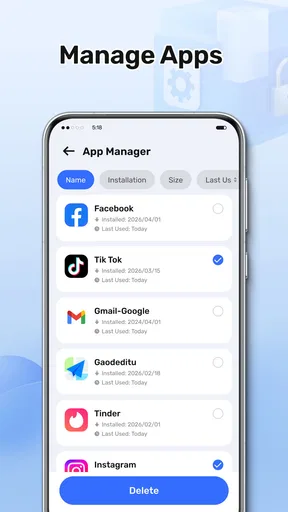
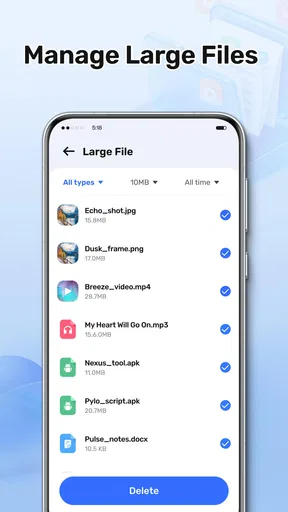
My overall impression is that it is most useful as a visual starting point. Instead of searching through folders one by one, I can use it to focus on large files and installed apps, then make the final decision myself. That distinction matters. A cleaner that deletes aggressively may free space quickly, but it can also create anxiety. CleanPro is better suited to someone who wants assistance finding clutter while keeping control over what leaves the phone.
It is a free tools app for everyone, and it runs on Android devices using version 7.0 or later. The current release is 1.1.0. Its average rating is 3.6, based on around 273 ratings, while the app has passed 100K installs. Those figures suggest a modest but established user base rather than a universally loved utility, so I approached it as a practical helper rather than a complete maintenance solution.
How CleanPro builds trust during a storage cleanup
I judge a cleanup tool by whether its choices feel understandable before I act, not by how quickly it promises to clear space. In this section, I’ll focus on the small checks that make a storage review feel more deliberate, including how I distinguish an obvious removal from a file that deserves a closer look. That same cautious approach also shapes what I expect from the app during a demanding cleanup.
A useful first step instead of a magic button
The most reassuring part of using CleanPro is the basic shape of the task. Managing storage is not presented to me as a single mysterious command that should be trusted blindly. The useful workflow is to inspect what is taking space, identify candidates, and then decide what action makes sense. That is a healthier approach for personal files because the largest item is not automatically disposable.
For example, a downloaded video may be large because I genuinely want to keep it offline. An old document may occupy very little space but still be important. A rarely opened app may be safe to remove, or it may contain local data I need later. CleanPro helps bring these choices into view, but the value comes from treating its suggestions as a shortlist rather than a verdict.
I especially like this mindset for people who are uncomfortable with cleaning utilities. The app’s purpose is easy to understand: locate large files and organize installed apps. That narrow focus makes more sense than expecting one tool to improve every aspect of a phone’s performance, battery life, privacy, and security at the same time.
What I check before allowing any cleanup
Trust in a storage tool depends less on a polished interface than on the moments immediately before deletion. I would not tap a broad cleanup control without first opening the relevant file group and checking names, locations, and context. If a file is unfamiliar, I leave it alone until I can identify which application created it and whether I still need it.
This is also where CleanPro’s limits become important. A storage overview can show where space is being used, but it cannot know the personal meaning of every file. A large folder of recordings might be clutter for one person and essential work for another. My practical rule is to use the app for discovery, then use the phone’s normal file or app settings when I need a second confirmation.
That extra pause is not wasted time. It prevents the common mistake of confusing “old” with “unwanted.” I would also avoid cleaning immediately before travel, an exam, a work deadline, or a device transfer. Those are precisely the moments when a forgotten local file can become unexpectedly valuable.
Permissions and data-sensitive moments
Any app that examines storage deserves a careful look at the choices shown during setup and use. I pay attention to which access requests appear, why they are needed, and whether the app lets me continue without granting something unrelated to the cleanup task. I also check the system permission screen afterward, because that gives me a clearer picture of what access remains active.
I do not treat the ability to scan files as proof that an app is unsafe. Storage management needs visibility into storage. At the same time, I do not assume that a familiar purpose makes every permission harmless. The sensible approach is to grant only what is necessary for the action I am performing and to revisit those permissions when I finish.
There are several data-sensitive moments in a normal session. The first is the initial scan, when the application needs to inspect storage in order to identify large items. The second is reviewing file names and locations, which can expose personal information on screen. The third is confirming a deletion. I keep these sessions private, avoid handing an unlocked phone to someone else during cleanup, and close the app when I am finished.
For a more cautious routine, I start with a small category rather than attempting a complete purge. I review a handful of clearly recognizable downloads, remove only what I can identify, and then check the available space in Android settings. This gives me a practical result without requiring me to trust a sweeping action.
Organizing apps without losing useful local data
App organization sounds simple until uninstalling an application becomes part of the process. CleanPro can help me notice which installed apps deserve attention, but the uninstall decision still needs context. Some apps store drafts, offline maps, downloaded media, or locally saved settings. Removing the app may affect that information even when I have not opened it recently.
Before uninstalling, I open the app itself if it might contain anything important. I look for an export, backup, sync, or account option where relevant, and I make sure I know whether the content is stored locally or connected to an account. This is one of the most useful habits to pair with CleanPro: let it reveal candidates, but investigate the candidate inside its own settings before removal.
There is also a difference between freeing storage and reducing visual clutter. If my main problem is a crowded home screen, uninstalling an app is excessive. If the problem is a nearly full device, removing a large unused game or media-heavy application may have a much greater effect than deleting several tiny files. I use the app list to prioritize rather than simply count how many items I can remove.
A realistic everyday cleanup
Imagine I am preparing for a weekend trip and my phone warns me that storage is almost full. I open CleanPro and begin with large files. I find an old offline film, several downloaded documents, and a set of images from a messaging conversation. The film is no longer needed, but the documents are related to the trip and the images are personal memories. I remove only the film after checking it, then review the app list and notice a large application I installed for a previous event.
Before uninstalling that application, I open it and confirm that I do not need its local content. Only then do I remove it. This two-stage process is slower than pressing a universal clean button, but it is much more comfortable. I know why each item was selected, and I can verify whether the storage warning improves afterward.
That scenario shows where CleanPro fits best. It reduces the time spent finding possible clutter, while I remain responsible for judging the consequences. For me, that balance is more valuable than a dramatic-looking cleanup screen.
What the app can and cannot replace
CleanPro sits between manual Android settings and more elaborate maintenance suites. Android’s built-in storage tools are often the safest reference because they are already part of the operating system and connect directly to system-level app management. They may be enough for someone who only needs to clear a cache, inspect storage categories, or uninstall an application occasionally.
Manual browsing is more precise but also more tiring. I can inspect folders myself, yet it is easy to overlook large items buried in an unfamiliar location. CleanPro is more convenient when I want a focused overview without remembering where every application saves its files.
On the other hand, people looking for cloud backup, duplicate-photo analysis, device security, battery diagnostics, or a broad privacy dashboard may prefer a specialized application for those jobs. I would not install CleanPro expecting it to replace backups or Android’s permission controls. Its strength is narrower: helping me identify storage pressure and organize apps.
This narrow role also affects who should skip it. If my phone has plenty of free space and I already maintain files carefully, adding another utility may not change much. I would also avoid relying on it as the only safeguard before deletion. Anyone managing work records, creative projects, medical documents, or family media should keep a separate backup routine regardless of which cleaner they use.
Small habits that make the results safer
My first tip is to sort by consequence, not just by size. A very large file can be easy to replace, while a small note may be irreplaceable. I start with items whose purpose is obvious, such as a completed download, and leave ambiguous files for later.
My second tip is to clean in sessions rather than constantly. A short review after a major download or a finished trip is easier to understand than repeated scanning throughout the day. It also makes it simpler to notice whether the space was recovered by deleting files or by uninstalling an app.
My third tip is to compare the result with Android’s own storage screen. If CleanPro highlights a category I do not understand, the system view can provide useful context before I act. This cross-check is especially worthwhile when the phone shows a large amount of “other” or application-related storage.
My fourth tip is to review permissions after completing the task. If I only needed access for a one-time scan, I prefer not to leave that access active indefinitely. This is a general Android habit, but it is particularly relevant for a tool whose job involves seeing stored content.
Finally, I keep the app’s role clear in my mind: it is a finder and organizer, not a substitute for judgment. That simple distinction prevents most of the disappointment and risk associated with storage cleaners.
Who will get the most from it
CleanPro makes the most sense for someone whose phone is becoming difficult to manage. If I regularly download files, install apps for temporary needs, or forget what is occupying storage, the app gives me a more direct way to create a cleanup shortlist. It is also approachable for users who find Android’s folder structure confusing but still want to approve removals themselves.
It can be useful before a phone migration, before recording a long event, or after returning from travel with a pile of offline content. In each case, the benefit is not that it understands my personal priorities. The benefit is that it helps me find material I might otherwise miss.
It is less suitable for someone seeking automatic, comprehensive maintenance. Users who want guaranteed recovery of a particular amount of space, deep duplicate detection, or extensive backup controls should look for tools designed specifically around those needs. I would also choose the built-in Android settings first if my concern is permissions, account access, or system behavior rather than storage organization.
My cautious verdict on CleanPro
After using CleanPro as a storage review tool, I see a straightforward utility with a sensible everyday purpose. It is free, aimed at everyone, and developed by AJ IT Solutions. The app’s presence on over 100K devices shows that it has found an audience, but its 3.6 average is a useful reminder to keep expectations realistic: convenience does not remove the need to inspect what is being changed.
The strongest reason to try it is the time saved locating large files and unused apps. The strongest reason to be careful is that storage labels cannot understand personal value. I would use it to surface candidates, confirm each choice, and then check the result through Android’s own settings. That workflow gives me the convenience of a dedicated cleaner without handing over the final decision.
My recommendation is cautious but positive: CleanPro is worth trying when storage is becoming a practical problem and I want a clearer starting point. I would not use it as an automatic delete button, and I would not treat it as a backup, security, or privacy-management replacement. Used with deliberate checks, it is a useful organizer; used without them, any storage cleaner can make an avoidable mistake.
Verdict
Strengths of CleanPro
- Simple interface makes common cleaning tasks easy to find.
- Quick scans help identify unnecessary files without much setup.
- Useful storage overview shows which categories take up space.
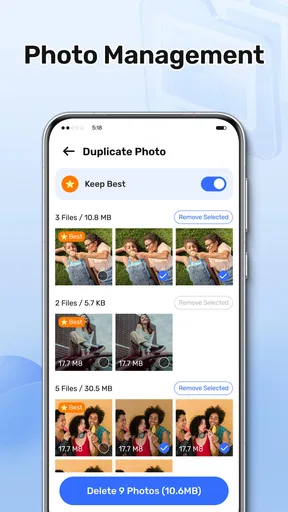
- Can help remove duplicate or leftover files from the device.
- Lightweight design should be easy on battery and storage usage.
Limitations of CleanPro
- Some suggested files may require careful review before deletion.
- Cleaning results can vary depending on the device and Android version.
- Extra features may be limited unless the app offers a premium plan.
- Frequent scans can provide only modest benefits on newer devices.
- Privacy permissions should be checked carefully before using all tools.
Similar Picks in This Category
View All
Google LLC4.0

Gboard - the Google Keyboard
Google LLC4.5

Google Play services
Google LLC4.3

Google Play Store
Google LLC4.9

Files by Google
Google LLC4.5

SHAREit: Transfer, Share Files
Smart Media4U Technology Pte.Ltd.4.3
Frequently Asked Questions
What is CleanPro and what can I use it for?
CleanPro is designed as a mobile cleaning and optimization tool that helps users review storage usage, identify unnecessary files, and keep their device more organized. Depending on the version and platform, it may also include tools for removing duplicate photos, managing large files, clearing temporary data, or improving privacy. Its usefulness depends on the permissions it requests and the specific features available on your device.
Is CleanPro safe to install and use on my Android or iPhone?
CleanPro should be downloaded only from the official Google Play Store or Apple App Store to reduce the risk of installing a modified or unsafe copy. Before using it, review its developer information, privacy policy, ratings, and requested permissions. A cleaning app normally needs access to files or photos to scan storage, but permissions unrelated to its main function should be considered carefully and denied when unnecessary.
Can CleanPro really improve my phone’s performance?
CleanPro may help free storage space by locating temporary files, large items, duplicate media, or content you no longer need. This can make a device feel less cluttered and may help when storage is nearly full. However, it cannot magically increase hardware performance, repair battery wear, or make every phone faster. Results depend on how much removable data is found and what you choose to delete.
Will CleanPro delete my photos, videos, or important files?
CleanPro should show the items selected for removal before completing a cleanup, but users should still review every category carefully. Photos, videos, documents, downloads, and messaging media can sometimes be identified as duplicates or unnecessary even when you want to keep them. Create a backup of important files first, check the preview screen, and avoid confirming automatic cleanup unless you understand exactly what will be removed.
Is CleanPro free, and does it include subscriptions or advertisements?
The availability of free features, advertisements, and premium tools can vary according to the CleanPro version, operating system, and region. Some cleaning apps offer basic scanning at no cost while placing advanced cleanup tools, privacy features, or an ad-free experience behind a subscription or one-time purchase. Check the store listing and in-app payment screen carefully, especially the renewal terms, before starting any trial.
